
Bitte ändert euer Passwort!
Im März 2026 wurde das Forum gehackt. Dabei hatten die Angreifer Zugriff auf die Datenbank und somit Zugriff auf eure Passwörter. Auch wenn das Forum kein Passwort im Klartext speichert, können die Angreifer eure Passwörter knacken. Bitte ändert daher dringend euer Passwort für das Forum. Solltet ihr das gleiche Passwort auch an anderer Stelle verwenden, ändert es bitte unbedingt an allen Stellen!
Fun with full-screen telemetry!
- Thorn
-
- Offline
- Moderator
-

- Beiträge: 3464
- Thanks: 1485
Re: Fun with full-screen telemetry!
08 März 2018 07:31finde deine App klasse, das ändern der einzelnen werten geht supper nur was ich noch nicht ganz so verstehe wie mach ich das dann Modell spezifisch dann benötige ich mehre apps und auch mehre JSN Dateien richtig??? Würde sie jetzt zu gern auf dem sender spielen.
Mfg
Thorn
Sorry, wegen meiner Rechtschreibung und Grammatik!!!
Lg Thorn
Bitte Anmelden oder Registrieren um der Konversation beizutreten.
- abief
-
- Offline
- Premium Mitglied
-

- I'm here, there and elsewhere!
- Beiträge: 95
- Thanks: 19
Re: Fun with full-screen telemetry!
18 März 2018 09:27 - 18 März 2018 09:30I'm taking a different approach to solve my specific needs. but hope it helps.
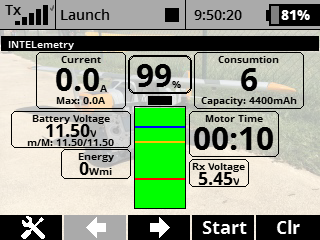
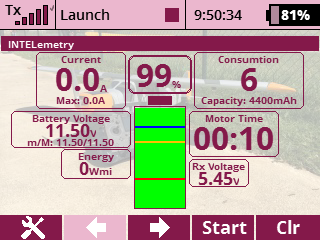
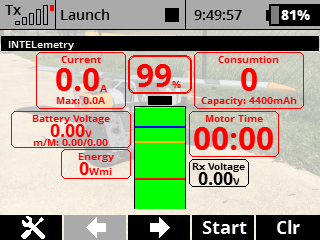
My approach. I'm creating an integrated screen that includes all the MUI or MEZON sensors, and it adapts to the different scenarios:
Sensors on screen:
Instant and Max Battery Current
Battery Consumption
Instant, Max and Min Battery Voltage
Instant Energy (only available when using MUI, and only available on MUI updated to 2.03)
Motor Timer
Instant Receiver Voltage
Graphic representation on screen:
Battery, with four levels of warning, customizable.
Battery Consumption percentage.
Sensor detection:
even if more sensors are connected, the INTelemetry application only allows to select any MUI or MEZON sensors
Embedded warnings:
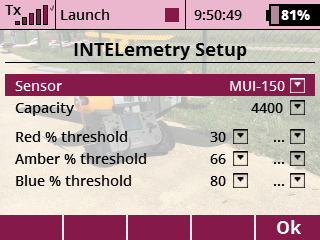
For the battery consumption, three warning levels are customizable, both in terms of level (as percentage of available capacity) and as a sound message.
For my configuration, I use:
Green: above 80%
Blue: between 80% and 67%
Amber: between 66% and 31%
Red: 30% and below.
If the sensor gets unavailable (for example, if Q is weak) the sensor text changes color, taking into consideration how long the signal is lost. The time is not customizable.
Blue: 500 millisecons without valid sensor
Amber: 2 seconds without a valid sensor
Red: 5 seconds without a valid sensor
The INTELemetry uses the system color profile where possible.
TODOS:
Incorporate MEZON-specific readings, such as PWM and motor speed.
Evaluate/incorporate the option to include other graphic sensors, such as horizon, bearing, airspeed for one plane where I have a fuller suite: GPS, RexAssist, Speed Sensor, Vario and Mezon.
Evaluate/incorporate the option to use a SBEC with telemetry when using Opto controllers, and to have that information also on screen.
Evaluate/incorporate the option for telemetry, including second receiver, backup receiver and/or central box.
Use warning colors that make sense depending on the color profile (example: in Warm Red the foreground color is red, as my alert color... not useful).
Have some sensors to be persistent and reset only when a specific switch is used and not when I turn off the receiver.
Include translations to German, French, Czech, French and Portuguese. At the moment, the application is available in English, Spanish and Italian, with other languages defaulting to English.
I've been able to keep the code as efficient as possible, and at the moment it looks that it should work on a 16 (not confirmed).
Factory line: FVT-3 (1m), A6M Zero (1.6m), Tiger Moth (2.2m), Grumann Goose (2m) and Beechcraft D18 (1.5m).
Design phase: Szd-20x Wampir II (7.5m), Rutan Quickie (1.6m), both parked.
Dreaming: Weird push-pull called Double Trouble (2.4m)
Bitte Anmelden oder Registrieren um der Konversation beizutreten.
- Thorn
-
- Offline
- Moderator
-
- Beiträge: 3464
- Thanks: 1485
Re: Fun with full-screen telemetry!
18 März 2018 09:36Sincerely
Thorn
Sorry, wegen meiner Rechtschreibung und Grammatik!!!
Lg Thorn
Bitte Anmelden oder Registrieren um der Konversation beizutreten.
- dedee
-
- Offline
- Junior Mitglied
-

- Beiträge: 39
- Thanks: 9
Re: Fun with full-screen telemetry!
18 März 2018 12:43i have copied:
InTel.lc -> Apps
InTel .. lang ..en/de (usw) . -> Apps
If i load the Applikation i get
Error in InTel: bad argument #1 to 'decode' (string expected, got nil)
to wich Path must i copy the language Files
Gruß Reinhard
Bitte Anmelden oder Registrieren um der Konversation beizutreten.
- hafromue
- Neues Mitglied
-

- Thanks: 0
Re: Fun with full-screen telemetry!
18 März 2018 14:33Above all, I would not load an app that does not have a * .lua file to control the code !!!
Bitte Anmelden oder Registrieren um der Konversation beizutreten.
- dedee
-
- Offline
- Junior Mitglied
-
- Beiträge: 39
- Thanks: 9
Re: Fun with full-screen telemetry!
18 März 2018 14:58 - 18 März 2018 15:01Am Simulator ist es vollkommen unproblematisch ein .lc Programm zu laden,
Jeti Lua ist ein Interpreter ohne die Möglichkeit C-Teile zu laden, set Aufrufe kannst du auch in der vorcompilierten Version erkennen.
Um mal zu sehen, was andere wie gelöst haben ist das für mich vollkommen ok.
Ein komplexes Source Programm (LUA) kann man ohne viel Arbeit auch nicht überblicken.
Gruß Reinhard
Bitte Anmelden oder Registrieren um der Konversation beizutreten.